












| 站長部落格 - lutuni 的日誌 |

 訂閱 lutuni 的日誌
 |
 醫學(5) 醫學(5) |
HTML語法(7) |
|
|
PHP 程式(1) |
SQL SERVER(15) |
ubuntu 技術資料(3) apache2(1)DNS(9)sendmail(5)Webmin(1)驅動程式(4) apache2(1)DNS(9)sendmail(5)Webmin(1)驅動程式(4) |
|
WINDOW 7作業系統(0)開機選單(1) |
windows作業(3)電腦系統工具(0) |
|
|
XOOPS入口網站(1) |
友站連結公司行號(3) |
其它的(12) |
|
程式計設系統分析(1) |
最新的日誌
|
分類: SQL SERVER
作者: lutuni (11:38 am)
|
果你的資料庫,原本是放在SQL 2008 Express裡,後來要改放到客戶的空間,是使用SQL 2005的版本,在匯入時,會無法匯入,並且出現要先降級的訊息,可以利用以下方式,把版本改成2005版。 步驟: 進入Microsoft SQL Server Management Studio 資料庫按右鍵-->工作-->產生指令碼。 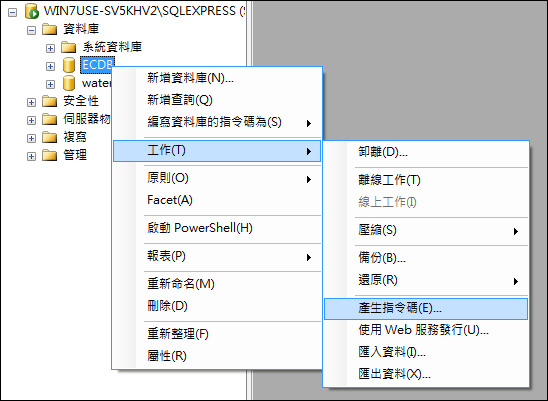 指令碼精靈畫面,按【下一步】。 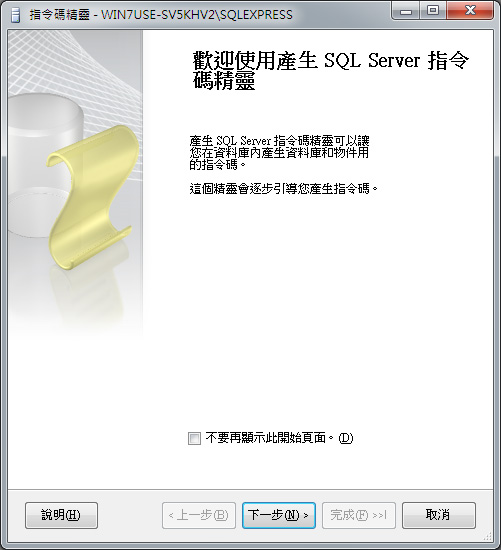 選擇要轉出的資料庫,按【下一步】。 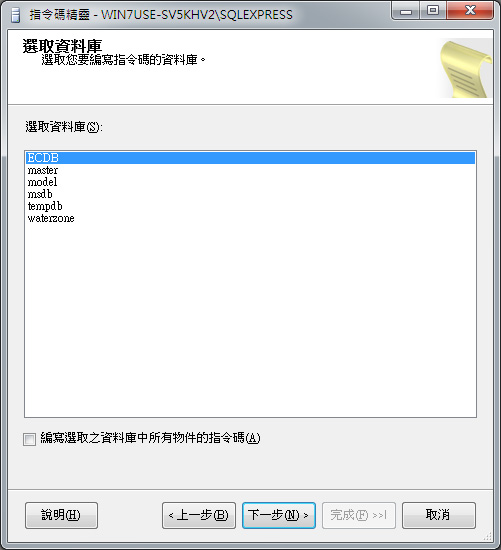 選擇指令碼選項的【針對伺服器版本編寫指令碼】,預設為【SQL Server 2008】,要將SQL Server 2008資料庫轉入SQL Server 2005,所以選擇【SQL Server 2005】,按【下一步】。(註:若是要轉入SQL Server 2000,針對伺服器版本編寫指令碼必須選擇SQL Server 2000。) 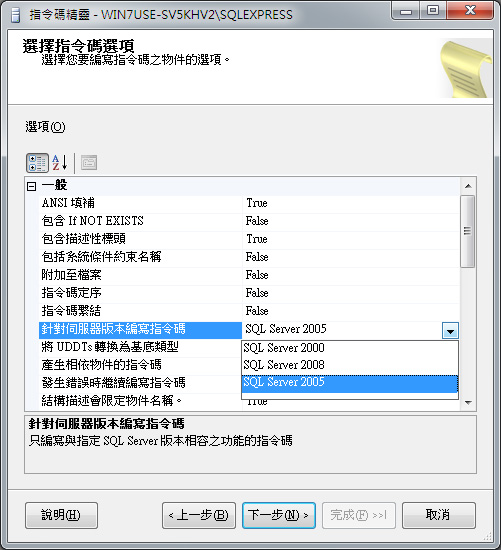 如果連資料庫內容都要轉出去,【編寫資料的指令碼】必須選擇【True】,預設為False。 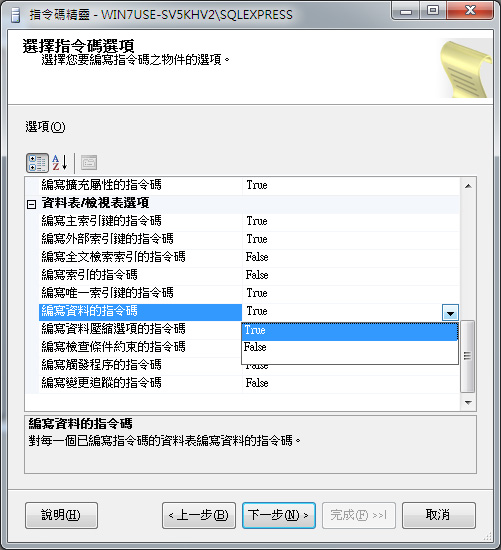 選擇物件類型,勾選後,按【下一步】。 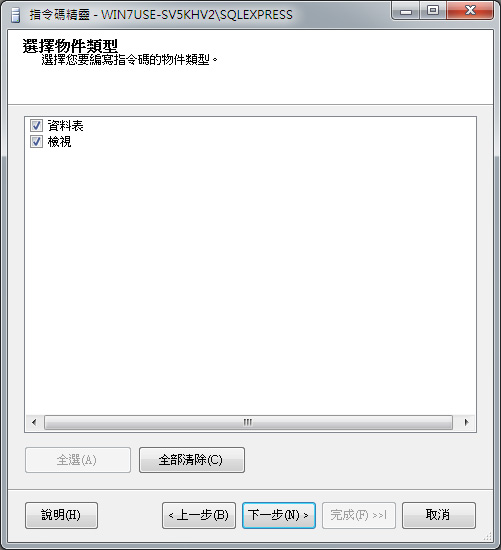 選擇資料表,按【下一步】。 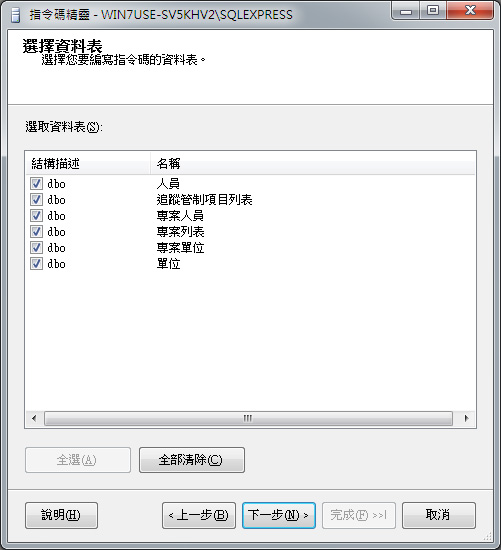 選擇檢視表,按【下一步】。 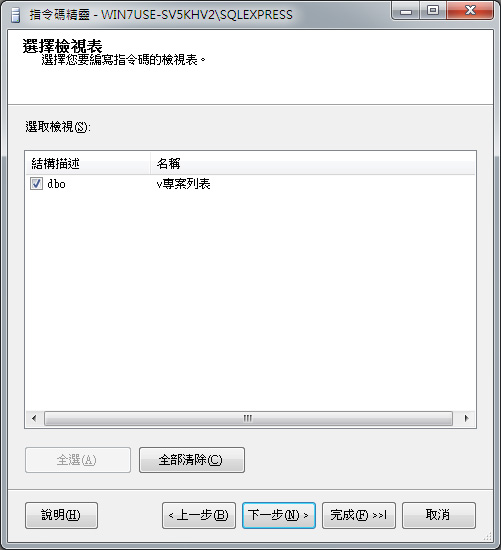 輸出選項的指令碼模式,選擇【編寫指令碼至檔案】,檔案名稱預設存放路徑為我的文件夾裡,預設檔名【script.sql】,依需求修改位置,另存為選擇【Unicode文字】,按【下一步】。 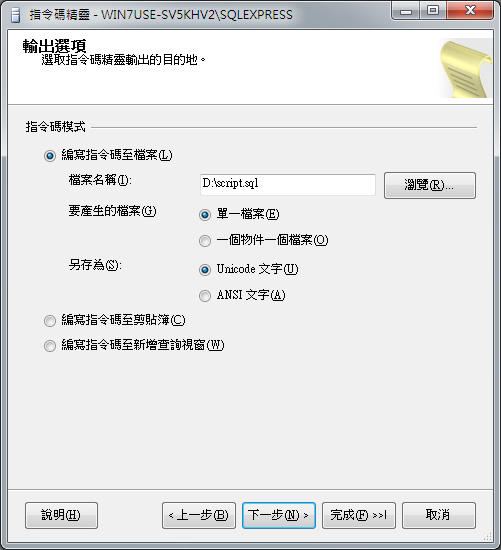 指令碼精靈摘要,按【完成】。 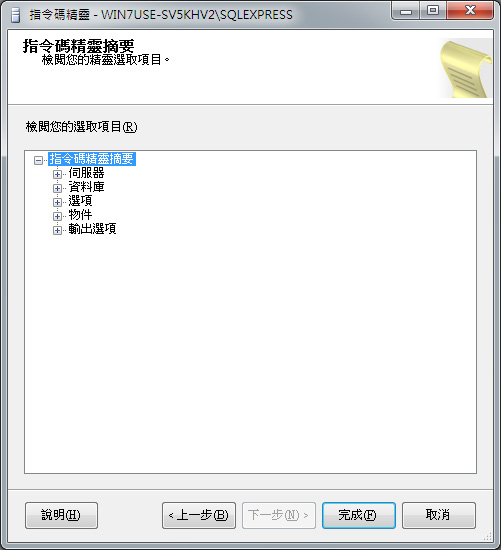 產生指令碼進度,如下圖所示,代表成必ㄔX,按【關閉】。 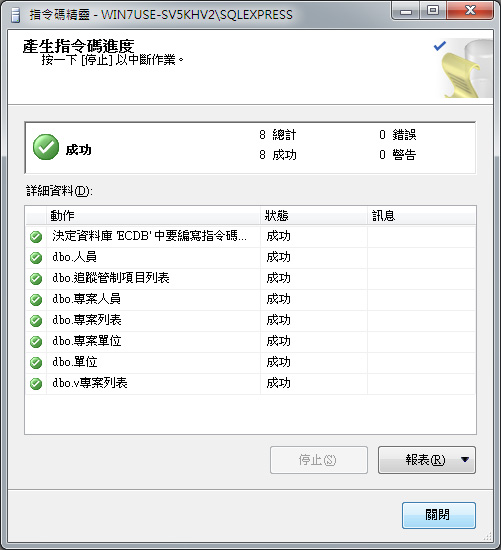 匯出後,會產生一個SQL檔,再拿到2005的電腦裡執行就Ok了。  SQL Server 2005部分: 先手動新增該資料庫,只需新增資料庫,內容不用動。 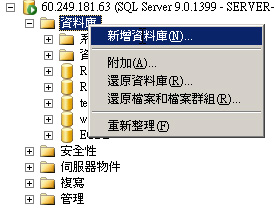 將SQL Server 2008上產生的指令碼【script.sql】複製到SQL Server 2005上,開啟指令碼,Microsoft SQL Server Management Studio的檔案-->開啟-->檔案。 選擇【script.sql】,按【開啟】。 按【執行】,訊息出現命令已順利完成,如下圖所示,代表指令碼執行成央C 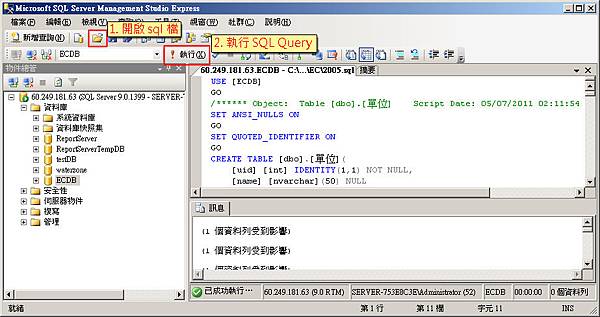 查詢一下資料表/檢視表正常轉入,如下圖所示。 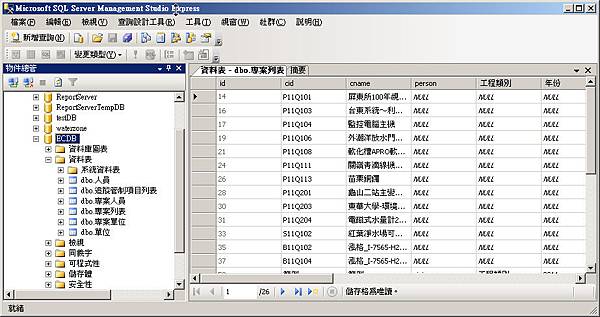 |
|
分類: SQL SERVER
作者: lutuni (4:35 pm)
|
 通過上述的檢查,  在檢查過環境後就是選擇要安裝的版本。 試用,那麼就選擇免費的版本。有序號則輸入序號。 
 版本選擇後,經過了授權條款,接下來會先安裝一些SQL Server安裝時需要的檔案。 而安裝支援檔案也同時會識別在安裝過程還有那些會導致安裝失敗的因素存在,  在剛剛的支援檔案安裝之後,可以看到表列出所檢查的項目比剛剛的多了。  若都通過,那麼接下來就開始選擇要安裝的項目以及要安裝的目的位置。  接下來是執行個體的設定,如果本機中是新安裝的,那麼當然就是選預設執行個體就行了。  顯示空間的容量大小  下一步之後就是伺服器組態,這裏要設定每一個服務的啟用帳戶,  以下的畫面是設定之後的, 另一個頁籤定序,則不做任何的更動。  資料庫引擎組態。  Analysis Services組態,同樣在這兒至少也要選擇一位指定的人員。  Reporting Services組態,在Foundation Server中一定會使用到Reporting Service,在Team Foundation 的安裝指引中提到在這兒是選擇「安裝但不設定報表伺服器」,因為安裝Team Foundation的過程中就會去設定報表伺服器了。  再來是錯誤報告方式,這裡我們直接選擇下一步……
 在經過上述的設定之後,SQL 2008會在做一次檢查,這次是針對之前所選擇的安裝項目。同樣的在檢查之後會給清單表列各個項目的檢查結果。  到這裏SQL 2008 Server己經完成所有的準備工作。  沒有什麼問題的話,就直接按下【安裝】,真正開始SQL 2008的安裝吧。   完成!  整個安裝過程其實很簡單,主要在過程中的一些項目有通過檢查的話就沒什麼問題了。

 |
|
分類: SQL SERVER
作者: lutuni (10:59 am)
|
查詢客戶 SELECT * FROM [Leader].[dbo].[COPMA] 查詢廠商 SELECT * FROM [Leader].[dbo].[PURMA] |
|
分類: SQL SERVER
作者: lutuni (1:46 pm)
|
UPDATE table SET field1=value1, field2=value2 WHERE condition_field=condition_value 供應廠商資料更改資料 付款條件:PAY12 加工費用科目:5522 應付帳款科目:2143 應付票據科目:2121 結帳日期:個月逢25日 UPDATE [DEMO].[dbo].[PURMA] SET [MA025]='當月票60天',[MA055]='PAY12',[MA042]='5522',[MA041]='2143',[MA043]='2121',[MA035]='25' UPDATE [Leader].[dbo].[PURMA] SET [MA025]='當月票60天',[MA055]='PAY12',[MA042]='5522',[MA041]='2143',[MA043]='2121',[MA035]='25' 客戶檔資料更改資料 帳款科目:1143 票據科目:1121 UPDATE [DEMO].[dbo].[COPMA] SET [MA047]='1143',[MA074]='1121' UPDATE [Leader].[dbo].[COPMA] SET [MA047]='1143',[MA074]='1121' 更改幣別 客戶 1. UPDATE [Leader].[dbo].[COPMA] SET [MA014]='NTD' WHERE [MA014]='NT$' 2. UPDATE [Leader].[dbo].[COPMA] SET [MA014]='USD' WHERE [MA014]='US$' 廠商 1. UPDATE [Leader].[dbo].[PURMA] SET [MA021]='NTD' WHERE [MA021]='NT$' 2. UPDATE [Leader].[dbo].[PURMA] SET [MA021]='USD' WHERE [MA021]='US$' 產品 UPDATE [Leader].[dbo].[INVMB] SET [COMPANY]='Leader',[CREATOR]='DS',[USR_GROUP]='0000',[CREATE_DATE]='20120419',[FLAG]=1 |
|
分類: SQL SERVER
作者: lutuni (1:34 pm)
|
SQL語法參考手冊(SQL) DB2 提供了關連式資料庫的查詢語言 SQL (Structured Query Language),是一種非常口語化、既易學又易懂的語法。此一語言幾乎是每個資料庫系統都必須提供的,用以表示關連式的*作,包含了資料的定義(DDL)以及資料的處理(DML)。SQL原來拼成SEQUEL,這語言的原型以“系統 R“的名字在 IBM 聖荷西實驗室完成,經過IBM內部及其他的許多使用性及效率測試,其結果相當令人滿意,並決定在系統R 的技術基礎發展出來 IBM 的產品。而且美國國家標準學會(ANSI)及國際標準化組織(ISO)在1987遵循一個幾乎是以 IBM SQL 為基礎的標準關連式資料語言定義。 一、資料定義 DDL(Data Definition Language) 資料定語言是指對資料的格式和形態下定義的語言,他是每個資料庫要建立時候時首先要面對的,舉凡資料分哪些表格關係、表格內的有什麽欄位元主鍵、表格和表格之間互相參考的關係等等,都是在開始的時候所必須規劃好的。 1、建表格: CREATE TABLE table_name( column1 DATATYPE [NOT NULL] [NOT NULL PRIMARY KEY], column2 DATATYPE [NOT NULL], ...) 說明: DATATYPE --是資料的格式,詳見表。 NUT NULL --可不可以允許資料有空的(尚未有資料填入)。 PRIMARY KEY --是本表的主鍵。 2、更改表格 ALTER TABLE table_name ADD COLUMN column_name DATATYPE 說明:增加一個欄位(沒有刪除某個欄位元的語法。 ALTER TABLE table_name ADD PRIMARY KEY (column_name) 說明:更改表得的定義把某個欄位設為主鍵。 ALTER TABLE table_name DROP PRIMARY KEY (column_name) 說明:把主鍵的定義刪除。 3、建立索引 CREATE INDEX index_name ON table_name (column_name) 說明:對某個表格的欄位元建立索引以增加查詢時的速度。 4、刪除 DROP table_name DROP index_name 二、的資料形態 DATATYPEs smallint 16 位元元的整數。 interger 32 位元元的整數。 decimal(p,s) p 精確值和 s 大小的十進位元整數,精確值p是指全部有幾個數(digits)大小值,s是指小數 點後有幾位數。如果沒有特別指定,則系統會設為 p=5; s=0 。 float 32位元的實數。 double 64位元的實數。 char(n) n 長度的字串,n不能超過 254。 varchar(n) 長度不固定且其最大長度為 n 的字串,n不能超過 4000。 graphic(n) 和 char(n) 一樣,不過其單位是兩個字元 double-bytes, n不能超過127。這個形態是為 了支援兩個字元長度的字體,例如中文字。 vargraphic(n) 可變長度且其最大長度為 n 的雙字元字串,n不能超過 2000。 date 包含了 年份、月份、日期。 time 包含了 小時、分鐘、秒。 timestamp 包含了 年、月、日、時、分、秒、千分之一秒。 三、資料*作 DML (Data Manipulation Language) 資料定義好之後接下來的就是資料的*作。資料的*作不外乎增加資料(insert)、查詢資料(query)、更改資料(update) 、刪除資料(delete)四種模式,以下分 別介紹他們的語法: 1、增加資料: INSERT INTO table_name (column1,column2,...) valueS ( value1,value2, ...) 說明: 1.若沒有指定column 系統則會按表格內的欄位元順序填入資料。 2.欄位元的資料形態和所填入的資料必須吻合。 3.table_name 也可以是景觀 view_name。 INSERT INTO table_name (column1,column2,...) SELECT columnx,columny,... FROM another_table 說明:也可以經過一個子查詢(subquery)把別的表格的資料填入。 2、查詢資料: 基本查詢 SELECT column1,columns2,... FROM table_name 說明:把table_name 的特定欄位元資料全部列出來 SELECT * FROM table_name WHERE column1 = xxx [AND column2 > yyy] [OR column3 <> zzz] 說明: 1.’*’表示全部的欄位元都列出來。 2.WHERE 之後是接條件式,把符合條件的資料列出來。 SELECT column1,column2 FROM table_name ORDER BY column2 [DESC] 說明:ORDER BY 是指定以某個欄位做排序,[DESC]是指從大到小排列,若沒有指明,則是從小到大 排列 組合查詢 組合查詢是指所查詢得資料來源並不只有單一的表格,而是聯合一個以上的 表格才能夠得到結果的。 SELECT * FROM table1,table2 WHERE table1.colum1=table2.column1 說明: 1.查詢兩個表格中其中 column1 值相同的資料。 2.當然兩個表格相互比較的欄位元,其資料形態必須相同。 3.一個複雜的查詢其動用到的表格可能會很多個。 整合性的查詢: SELECT COUNT (*) FROM table_name WHERE column_name = xxx 說明: 查詢符合條件的資料共有幾筆。 SELECT SUM(column1) FROM table_name 說明: 1.計算出總和,所選的欄位必須是可數的數位形態。 2.除此以外還有 AVG() 是計算平均、MAX()、MIN()計算最大最小值的整合性查詢。 SELECT column1,AVG(column2) FROM table_name GROUP BY column1 HAVING AVG(column2) > xxx 說明: 1.GROUP BY: 以column1 為一組計算 column2 的平均值必須和 AVG、SUM等整合性查詢的關鍵字 一起使用。 2.HAVING : 必須和 GROUP BY 一起使用作為整合性的限制。 複合性的查詢 SELECT * FROM table_name1 WHERE EXISTS ( SELECT * FROM table_name2 WHERE conditions ) 說明: 1.WHERE 的 conditions 可以是另外一個的 query。 2.EXISTS 在此是指存在與否。 SELECT * FROM table_name1 WHERE column1 IN ( SELECT column1 FROM table_name2 WHERE conditions ) 說明: 1. IN 後面接的是一個集合,表示column1 存在集合裏面。 2. SELECT 出來的資料形態必須符合 column1。 其他查詢 SELECT * FROM table_name1 WHERE column1 LIKE ’x%’ 說明:LIKE 必須和後面的’x%’ 相呼應表示以 x為開頭的字串。 SELECT * FROM table_name1 WHERE column1 IN (’xxx’,’yyy’,..) 說明:IN 後面接的是一個集合,表示column1 存在集合裏面。 SELECT * FROM table_name1 WHERE column1 BETWEEN xx AND yy 說明:BETWEEN 表示 column1 的值介於 xx 和 yy 之間。 3、更改資料: UPDATE table_name SET column1=’xxx’ WHERE conditoins 說明: 1.更改某個欄位設定其值為’xxx’。 2.conditions 是所要符合的條件、若沒有 WHERE 則整個 table 的那個欄位元都會全部被更改。 4、刪除資料: DELETE FROM table_name WHERE conditions 說明:刪除符合條件的資料。 說明:關於WHERE條件後面如果包含有日期的比較,不同資料庫有不同的運算式。具體如下: (1)如果是ACCESS資料庫,則為:WHERE mydate>#2000-01-01# (2)如果是ORACLE資料庫,則為:WHERE mydate>cast(’2000-01-01’ as date) 或:WHERE mydate>to_date(’2000-01-01’,’yyyy-mm-dd’) 在Delphi中寫成: thedate=’2000-01-01’; query1.SQL.add(’select * from abc where mydate>cast(’+’’’’+thedate+’’’’+’ as date)’); 如果比較日期時間型,則為: WHERE mydatetime>to_date(’2000-01-01 10:00:01’,’yyyy-mm-dd hh24:mi:ss’) |
|
分類: ubuntu 技術資料驅動程式 :
作者: lutuni (1:25 pm)
|
當我遇到點陣列表機時都會將驅動程式用成EPSON LQ-1070C的印表機 很多跳頁,套表會走掉的問題都OK可以解決!! |
|
分類: 友站連結公司行號
作者: lutuni (12:14 pm)
|
http://www.watercity88.com/ 公司名: 定城企業有限公司 公司電話: 8867-7106898 FAX:8867-7108898 E-Mail: water.city88@seed.net.tw 經營理念: 熱忱-以人為本、以顧客為先的服務精神。 積極-勤奮務實、勇於任事的工作精神。 嚴謹-誠懇樸實、實事求是的工作態度。 創新-不斷創新,提供最新最好的服務和產品給顧客。 公司業務:RO機/飲用水/桶裝水廠設備規劃設計施工/ RO機零件買賣業務 1994初創成立東育企業行,從事廚具/熱水器/RO機/衛浴設備買賣業務。 1997 加盟安德成,開始走入水處理專業業務,成為安德成高雄營業處,從事RO機 1998 入主安德成總公司股東,設立安城商行,更積極推動各項業務,年底進入董事會。 1999 因應加盟商及市場需求,投入加水站推展。 2000 本公司設計G型架式RO機架及小型商用機,市場反應良好,業界紛紛防校, 2000 開始投入自有產品的研發/設計/製造,於年底12月份註冊創立自有品牌, 2001 開始推廣"水城市"淨水系列產品業務,持續研發系列產品,5月研發超智慧型小型商用機 2002 開始研發商用市場系列產品,超智慧型AB小型商用機300G~500G,4月上市。 2003 研發中型商用機800G~6000G,9月上市。 2004 開始推廣商用機業務,擴大業務範圍(家用機~中型商用機),並於當年6月以資本額 500萬元,成立"定城企業有限公司",正式邁入更專業化領域,且開始投入 自製元件的研發及產品模組 2005 開始更專業化服務,依客戶需求,作桶裝水廠規劃/設計/製造/施工的整體工程;專用 週邊輔助設備:專用水處理設備:代客設計製造專賣家用淨水系列產品。 2006 開始投入機器整體化設計,跳脫拼裝機組裝模式,整體/美觀/維護/需求/實用五大原則 2007 依商用市場客戶需求,首創商用機馬達保護自動附歸裝置,200G~500G系列機型,及免補型家用RO機,專利通過。 |
|
分類: 友站連結公司行號
作者: lutuni (11:40 am)
|
網址:http://www.yowey.com.tw/ 優衛飲水器材公司 耀暐企業有限公司成於1995年,專業於飲水設備,及相關零組件之研發製造與銷售.我們擁有最專業的研發團隊及高科技的生產設備,從產品設計,模具開發, 生產設備,產品設計,模具開發,生產製造及各一項測試,皆重重把關,提供國內外客戶最優良的品質及最合理的價格並為客戶創造最優良的品質及最合理的價格並 為客戶創造最優勢的力. 本公司主力產品為各式鐵板,鐵架,及高低壓開關等等..,未來本公司如今持續不斷的研發新產品以達到台灣及國際間更強烈的肯定 。 公司名稱: 耀暐企業有限公司 公司地址: 高雄市鳳山區建國路一段253號 公司電話:(07)702-6100 公司傳真:(07)702-6003 E-Mail: yowey.a3813@gmail.com |
|
分類: OSCommerce電子商務
作者: lutuni (12:53 pm)
|
<?php /* original: $Id: product_listing.php,v 1.44 2003/06/09 22:49:43 hpdl Exp $ corrected for proper HTML 2005/07/10 JanZ merged and updated by djmonkey1 with indispensable assistance by JanZ 2005/10/05 v2.1 developed by djmonkey1 with indispensable assistance by the Mighty JanZ 2005/10/09 reverted to a non-SPPC state by djmonkey1 osCommerce, Open Source E-Commerce Solutions http://www.oscommerce.com Copyright (c) 2003 osCommerce Released under the GNU General Public License */ //bof product listing with attributes $list_box_contents = array(); $list_box_contents[] = array('params' => 'class="productListing-heading"'); $cur_row = sizeof($list_box_contents) - 1; for ($col=0, $n=sizeof($column_list); $col<$n; $col++) { switch ($column_list[$col]) { case 'PRODUCT_LIST_MULTIPLE': $add_multiple = "1"; echo '<form name="buy_now_" method="post" action="' . tep_href_link(basename($PHP_SELF), tep_get_all_get_params(array('action')) . 'action=add_multiple', 'NONSSL') . '">'; break; }} //eof product listing with attributes ?> <?php $listing_split = new splitPageResults($listing_sql, MAX_DISPLAY_SEARCH_RESULTS, 'p.products_id'); if ( ($listing_split->number_of_rows > 0) && ( (PREV_NEXT_BAR_LOCATION == '1') || (PREV_NEXT_BAR_LOCATION == '3') ) ) { ?> <table border="0" width="100%" cellspacing="0" cellpadding="2"> <tr> <td class="smallText" align="right"><?php echo TEXT_RESULT_PAGE . ' ' . $listing_split->display_links(MAX_DISPLAY_PAGE_LINKS, tep_get_all_get_params(array('page', 'info', 'x', 'y'))); ?></td> </tr> </table> <?php } $list_box_contents = array(); if ($listing_split->number_of_rows > 0) { $row = 0; //$rows = 0; $column = 0; $listing_query = tep_db_query($listing_split->sql_query); while ($listing = tep_db_fetch_array($listing_query)) { // WARNING the code assumes there are three products per row. To use a different number change the number // at line 195: if ($column >= 3) and the code to fill up the table row below that accordingly // $counter = $row; // $class_for_buy_now = 'class="productListing-odd"'; // $list_box_contents[$row] = array('params' => 'class="productListing-odd"'); $rows++; if (($rows/2) == floor($rows/2) && ($row > $counter)) { $list_box_contents[$row] = array('params' => 'class="productListing-even"'); $class_for_buy_now = 'class="productListing-even"'; $counter = $row; } else { if ($row > $counter) { $list_box_contents[$row] = array('params' => 'class="productListing-odd"'); $class_for_buy_now = 'class="productListing-odd"'; $counter = $row; } } $product_contents = array(); for ($col=0, $n=sizeof($column_list); $col<$n; $col++) { $lc_align = ''; switch ($column_list[$col]) { case 'PRODUCT_LIST_MODEL': $lc_align = ''; $lc_text = ' ' . $listing['products_model'] . ' '; break; case 'PRODUCT_LIST_NAME': $lc_align = ''; if (isset($HTTP_GET_VARS['manufacturers_id'])) { $lc_text = '<a href="' . tep_href_link(FILENAME_PRODUCT_INFO, 'manufacturers_id=' . $HTTP_GET_VARS['manufacturers_id'] . '&products_id=' . $listing['products_id']) . '">' . $listing['products_name'] . '</a>'; } else { $lc_text = ' <a href="' . tep_href_link(FILENAME_PRODUCT_INFO, ($cPath ? 'cPath=' . $cPath . '&' : '') . 'products_id=' . $listing['products_id']) . '">' . $listing['products_name'] . '</a> '; } break; case 'PRODUCT_LIST_MANUFACTURER': $lc_align = ''; $lc_text = ' <a href="' . tep_href_link(FILENAME_DEFAULT, 'manufacturers_id=' . $listing['manufacturers_id']) . '">' . $listing['manufacturers_name'] . '</a> '; break; case 'PRODUCT_LIST_PRICE': $lc_align = 'right'; if (tep_not_null($listing['specials_new_products_price'])) { $lc_text = ' <s>' . $currencies->display_price($listing['products_price'], tep_get_tax_rate($listing['products_tax_class_id'])) . '</s> <span class="productSpecialPrice">' . $currencies->display_price($listing['specials_new_products_price'], tep_get_tax_rate($listing['products_tax_class_id'])) . '</span> '; } else { $lc_text = ' ' . $currencies->display_price($listing['products_price'], tep_get_tax_rate($listing['products_tax_class_id'])) . ' '; } //zeph if price is 0.00 then dont display price $pprice = $currencies->display_price($listing['products_price'], tep_get_tax_rate($listing['products_tax_class_id'])); if ($pprice == "$0.00") { $lc_text = 'See listing for price.'; } break; case 'PRODUCT_LIST_QUANTITY': $lc_align = 'right'; //$lc_text = 'Stock: ' . $listing['products_quantity'] . ' '; $lc_text = ''; break; case 'PRODUCT_LIST_WEIGHT': $lc_align = 'right'; $lc_text = ' ' . $listing['products_weight'] . ' '; break; case 'PRODUCT_LIST_IMAGE': $lc_align = 'center'; if (isset($HTTP_GET_VARS['manufacturers_id'])) { //zeph use custom image sizes. original code is commented out. $lc_text = '<a href="' . tep_href_link(FILENAME_PRODUCT_INFO, 'manufacturers_id=' . $HTTP_GET_VARS['manufacturers_id'] . '&products_id=' . $listing['products_id']) . '">' . tep_image(DIR_WS_IMAGES . 'thum/thum_' . $listing['products_image'], $listing['products_name'], $listing['products_image_width']/*SMALL_IMAGE_WIDTH*/, $listing['products_image_height']/*SMALL_IMAGE_HEIGHT*/) . '</a>'; } else { $lc_text = ' <a href="' . tep_href_link(FILENAME_PRODUCT_INFO, ($cPath ? 'cPath=' . $cPath . '&' : '') . 'products_id=' . $listing['products_id']) . '">' . tep_image(DIR_WS_IMAGES . 'thum/thum_' . $listing['products_image'], $listing['products_name'], $listing['products_image_width']/*SMALL_IMAGE_WIDTH*/, $listing['products_image_height']/*SMALL_IMAGE_HEIGHT*/) . '</a> '; } break; //bof product listing with attributes case 'PRODUCT_LIST_BUY_NOW': $lc_align = 'center'; if ($listing['products_quantity']>=2000) { $lc_text = tep_image_button('button_buy_now_na.gif', IMAGE_BUTTON_BUY_NOW_NA) . ' '; } else { $lc_text = '<a href="' . tep_href_link(basename($PHP_SELF), tep_get_all_get_params(array('action')) . 'action=buy_now&products_id=' . $listing['products_id']) . '">' . tep_image_button('button_buy_now.gif', IMAGE_BUTTON_BUY_NOW) . '</a> '; } break; // Begin Buy Now button with attributes and quantity mod // Begin Add Multiple with attributes Contrib case 'PRODUCT_LIST_MULTIPLE': $lc_align = 'right'; $lc_valign = 'top'; $lc_text = (TABLE_HEADING_MULTIPLE . tep_draw_input_field('Qty_ProdId_' . $listing['products_id'], '0', 'size="4"')); //zeph adds p.products_image_height and p.products_image_width to query $product_info_query = tep_db_query("select p.products_id, pd.products_name, pd.products_description, p.products_model, p.products_quantity, p.products_image, p.products_image_height, p.products_image_width, pd.products_url, p.products_price, p.products_tax_class_id, p.products_date_added, p.products_date_available, p.manufacturers_id from " . TABLE_PRODUCTS . " p, " . TABLE_PRODUCTS_DESCRIPTION . " pd where p.products_status = '1' and p.products_id = '" . $listing['products_id'] . "' and pd.products_id = p.products_id and pd.language_id = '" . $languages_id . "'"); $product_info = tep_db_fetch_array($product_info_query); $products_attributes_query = tep_db_query("select count(*) as total from " . TABLE_PRODUCTS_OPTIONS . " popt, " . TABLE_PRODUCTS_ATTRIBUTES . " patrib where patrib.products_id='" . $listing['products_id'] . "' and patrib.options_id = popt.products_options_id and popt.language_id = '" . $languages_id . "'"); $products_attributes = tep_db_fetch_array($products_attributes_query); if ($products_attributes['total'] > 0) { $lc_text .= '<table border="0" cellpadding="0" cellspacing"0">'; $products_options_name_query = tep_db_query("select distinct popt.products_options_id, popt.products_options_name from " . TABLE_PRODUCTS_OPTIONS . " popt, " . TABLE_PRODUCTS_ATTRIBUTES . " patrib where patrib.products_id='" . $listing['products_id'] . "' and patrib.options_id = popt.products_options_id and popt.language_id = '" . $languages_id . "'"); while ($products_options_name = tep_db_fetch_array($products_options_name_query)) { $selected = 0; $products_options_array = array(); $lc_text .= '<tr><td class="main">' . $products_options_name['products_options_name'] . ':</td><td>' . "\n"; $products_options_query = tep_db_query("select pov.products_options_values_id, pov.products_options_values_name, pa.options_values_price, pa.price_prefix from " . TABLE_PRODUCTS_ATTRIBUTES . " pa, " . TABLE_PRODUCTS_OPTIONS_VALUES . " pov where pa.products_id = '" . $listing['products_id'] . "' and pa.options_id = '" . $products_options_name['products_options_id'] . "' and pa.options_values_id = pov.products_options_values_id and pov.language_id = '" . $languages_id . "'"); while ($products_options = tep_db_fetch_array($products_options_query)) { $products_options_array[] = array('id' => $products_options['products_options_values_id'], 'text' => $products_options['products_options_values_name']); if ($products_options['options_values_price'] != '0') { $products_options_array[sizeof($products_options_array)-1]['text'] .= ' (' . $products_options['price_prefix'] . $currencies->display_price($products_options['options_values_price'], tep_get_tax_rate($product_info['products_tax_class_id'])) .') '; } } //$lc_text .= tep_draw_pull_down_menu('id[' . $products_options_name['products_options_id'] . ']', $products_options_array, $cart->contents[$HTTP_GET_VARS['products_id']]['attributes'][$products_options_name['products_options_id']]); //$lc_text .= tep_draw_pull_down_menu('id_'.$listing[$x]['products_id'].'[' . $products_options_name_values['products_options_id'] . ']', $products_options_array); $lc_text .= tep_draw_pull_down_menu('id_'.$listing['products_id'].'[' . $products_options_name['products_options_id'] . ']', $products_options_array, $cart->contents[$HTTP_GET_VARS['products_id']]['attributes'][$products_options_name['products_options_id']]); //$lc_text .= tep_draw_pull_down_menu('id[' . $products_options_name['products_options_id'] . ']', $products_options_array, $cart->contents[$HTTP_GET_VARS['products_id']]['attributes'][$products_options_name['products_options_id']]); $lc_text .= '</td></tr>'; } $lc_text .= '</table>'; } break; case 'PRODUCT_LIST_BUY_NOW_MULTIPLE': $lc_align = 'right'; $lc_valign = 'top'; $lc_text = '<form name="buy_now_' . $listing['products_id'] . '" method="post" action="' . tep_href_link(basename($PHP_SELF), tep_get_all_get_params(array('action')) . 'action=buy_now_form', 'NONSSL') . '">'; //zeph adds p.products_image_height and p.products_image_width $lc_text .= (TABLE_HEADING_MULTIPLE) . '<input type="text" name="cart_quantity" value="1" maxlength="6" size="4">'; $product_info_query = tep_db_query("select p.products_id, pd.products_name, pd.products_description, p.products_model, p.products_quantity, p.products_image, p.products_image_height, p.products_image_width, pd.products_url, p.products_price, p.products_tax_class_id, p.products_date_added, p.products_date_available, p.manufacturers_id from " . TABLE_PRODUCTS . " p, " . TABLE_PRODUCTS_DESCRIPTION . " pd where p.products_status = '1' and p.products_id = '" . $listing['products_id'] . "' and pd.products_id = p.products_id and pd.language_id = '" . $languages_id . "'"); $product_info = tep_db_fetch_array($product_info_query); $products_attributes_query = tep_db_query("select count(*) as total from " . TABLE_PRODUCTS_OPTIONS . " popt, " . TABLE_PRODUCTS_ATTRIBUTES . " patrib where patrib.products_id='" . $listing['products_id'] . "' and patrib.options_id = popt.products_options_id and popt.language_id = '" . $languages_id . "'"); $products_attributes = tep_db_fetch_array($products_attributes_query); if ($products_attributes['total'] > 0) { $lc_text .= '<table border="0" cellpadding="0" cellspacing"0">'; $products_options_name_query = tep_db_query("select distinct popt.products_options_id, popt.products_options_name from " . TABLE_PRODUCTS_OPTIONS . " popt, " . TABLE_PRODUCTS_ATTRIBUTES . " patrib where patrib.products_id='" . $listing['products_id'] . "' and patrib.options_id = popt.products_options_id and popt.language_id = '" . $languages_id . "'"); while ($products_options_name = tep_db_fetch_array($products_options_name_query)) { $selected = 0; $products_options_array = array(); $lc_text .= '<tr><td class="main">' . $products_options_name['products_options_name'] . ':</td><td>' . "\n"; $products_options_query = tep_db_query("select pov.products_options_values_id, pov.products_options_values_name, pa.options_values_price, pa.price_prefix from " . TABLE_PRODUCTS_ATTRIBUTES . " pa, " . TABLE_PRODUCTS_OPTIONS_VALUES . " pov where pa.products_id = '" . $listing['products_id'] . "' and pa.options_id = '" . $products_options_name['products_options_id'] . "' and pa.options_values_id = pov.products_options_values_id and pov.language_id = '" . $languages_id . "'"); while ($products_options = tep_db_fetch_array($products_options_query)) { $products_options_array[] = array('id' => $products_options['products_options_values_id'], 'text' => $products_options['products_options_values_name']); if ($products_options['options_values_price'] != '0') { $products_options_array[sizeof($products_options_array)-1]['text'] .= ' (' . $products_options['price_prefix'] . $currencies->display_price($products_options['options_values_price'], tep_get_tax_rate($product_info['products_tax_class_id'])) .') '; } } $lc_text .= tep_draw_pull_down_menu('id[' . $products_options_name['products_options_id'] . ']', $products_options_array, $cart->contents[$HTTP_GET_VARS['products_id']]['attributes'][$products_options_name['products_options_id']]); //$lc_text .= tep_draw_pull_down_menu('id_'.$listing['products_id'].'[' . $products_options_name['products_options_id'] . ']', $products_options_array, $cart->contents[$HTTP_GET_VARS['products_id']]['attributes'][$products_options_name['products_options_id']]); $lc_text .= '</td></tr>'; } $lc_text .= '</table>'; $lc_text .= tep_draw_hidden_field('products_id', $product_info['products_id']) . tep_image_submit('button_buy_now.gif', TEXT_BUY . $listing['products_name'] . TEXT_NOW); } if ($products_attributes['total'] == 0) { $lc_text .= '<br> '; $lc_text .= tep_draw_hidden_field('products_id', $product_info['products_id']) . tep_image_submit('button_buy_now.gif', TEXT_BUY . $listing['products_name'] . TEXT_NOW); $lc_text .= '<br> '; $lc_text .= '<table border="0" cellpadding="0" cellspacing"0"><tr><td class="main"></td><td></td></tr></table>'; } $lc_text .= '</form>'; break; // End Add Multiple mod } $product_contents[] = $lc_text; } $lc_text = implode('<br>', $product_contents); $list_box_contents[$row][$column] = array('align' => 'center', //bof product listing with attributes 'valign' => $lc_valign, //eof product listing with attributes 'params' => 'class="productListing-data"', //zeph 'text' => '<table width="99%" border="0" cellspacing="0" cellpadding="0"> <tr> <td align="right" valign="bottom" bordercolor="0"><img src="images/infobox_module/upper_left.gif" width="14" height="33" /></td> <td background="images/infobox_module/top.gif" class=mws_boxTop_module ></td> <td align="left" valign="bottom"><img src="images/infobox_module/upper_right.gif" width="14" height="33" /></td> </tr> <tr> <td background="images/infobox_module/left.gif" width="14"> </td> <td align="center" class=mws_boxCenter_module>' . $lc_text . '</td> <td background="images/infobox_module/right.gif" class="smallText" width="14"><img src="images/infobox_module/right.gif" width="14" height="149" /></td> </tr> <tr> <td align="right" valign="top"><img src="images/infobox_module/lower_left.gif" width="14" height="12" /></td> <td background="images/infobox_module/bot.gif"><img src="images/infobox_module/bot.gif" width="2" height="12" /></td> <td align="left" valign="top" class="smallText"><img src="images/infobox_module/lower_right.gif" width="14" height="12" /></td> </tr> </table>'); //'text' => $lc_text); $column ++; if ($x == ($no_of_listings -1)) { // fill up the remainder of the table row with empty cells, assumes three products per row! if ($column == '1') { $list_box_contents[$row][$column + 1] = array('align' => 'center', //bof product listing with attributes 'valign' => $lc_valign, //eof product listing with attributes 'params' => 'class="productListing-data"', 'text' => " "); $column ++; } if ($column == '2') { $list_box_contents[$row][$column + 1] = array('align' => 'center', //bof product listing with attributes 'valign' => $lc_valign, //eof product listing with attributes 'params' => 'class="productListing-data"', 'text' => " "); } } if ($column >= 3 || $x == ($no_of_listings -1) ) { $row ++; // we start a new tr here with $list_box_contents $list_box_contents[$row] = array('params' => $class_for_buy_now); $column = 0; } } // end for ($x = 0; $x < $no_of_listings; $x++) new productListingBox($list_box_contents); } else { $list_box_contents = array(); $list_box_contents[0] = array('params' => 'class="productListing-odd"'); $list_box_contents[0][] = array('params' => 'class="productListing-data"', 'text' => TEXT_NO_PRODUCTS); new productListingBox($list_box_contents); } if ( ($listing_split->number_of_rows > 0) && ((PREV_NEXT_BAR_LOCATION == '2') || (PREV_NEXT_BAR_LOCATION == '3')) ) { ?> <table border="0" width="100%" cellspacing="0" cellpadding="2"> <tr> <td class="smallText"><?php //echo $listing_split->display_count(TEXT_DISPLAY_NUMBER_OF_PRODUCTS); ?></td> <td class="smallText" align="right"><?php echo TEXT_RESULT_PAGE . ' ' . $listing_split->display_links(MAX_DISPLAY_PAGE_LINKS, tep_get_all_get_params(array('page', 'info', 'x', 'y'))); ?></td> </tr> <?php if ($add_multiple == "1"){ ?> <tr> <td align="left" class="main"><!--a href="<//?php echo tep_href_link(FILENAME_CHECKOUT_PAYMENT, 'file:///Y|/Documents/Websites/Best%20Test%20Site/catalog/includes/modules/%20', 'SSL'); ?>"><//?php echo tep_image_button('button_checkout.gif', IMAGE_BUTTON_CHECKOUT); ?></a--></td> <td align="right" class="main"><?php echo tep_image_submit('button_in_cart.gif', IMAGE_BUTTON_IN_CART); ?></td> </tr> <?php } ?> </table> <?php } ?> |